Automotive industry
A tier-one automotive supplier trains twice as fast
Autonomous operator training, guided in augmented reality on the real equipment.
Result: training speed doubled.
Mechanical engineering, machining and metalworking
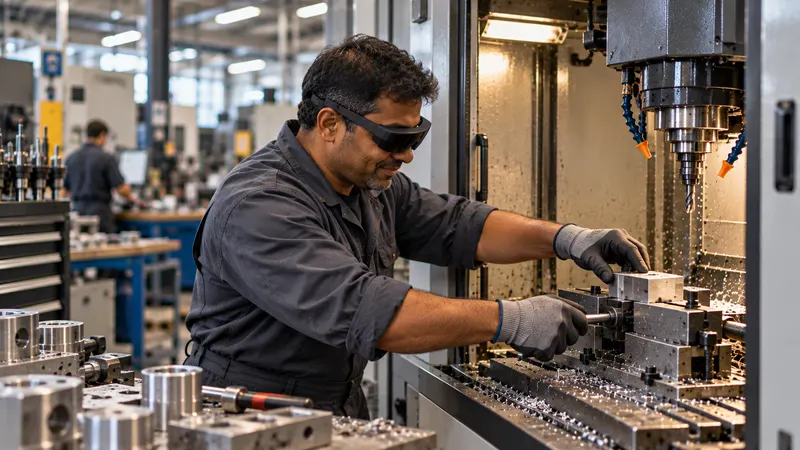
Machining, setting, boilermaking, welding, foundry: your experts pass on their skills in a few minutes, on the real equipment, without putting down their tools. Your newcomers learn them guided in augmented reality. No cloud, no online account: nothing leaves your workshop.
Your challenges
Every departure of an experienced setter, boilermaker or welder takes away know-how that nobody has had time to write down.
Machining equipment operators, setters: among the hardest trades to recruit for in industry.
Boilermakers, sheet-metal workers, pipefitters, welders: difficult recruitment.
Setting, batch changeover: knowledge that rests on a handful of people. Every poorly managed changeover costs availability.
Moulding, cores, melting, sheet-metal forming: tacit knowledge that leaves with your veterans.
Your experts are leavingParameters, tips, processes: they make you competitive and have no business being in a cloud.
Secrets to protectWhat SHIFT89 changes
What the setter, the new operator and the workshop manager experience.
Your settings and processes never leave the workshop: no cloud, no online account, no data held by the software publisher.
Learn moreHands covered in cutting oil have no business on a tablet: the instruction is displayed on the machine, the setter keeps their tools in hand.
Learn moreYour setter passes on their batch changeover while doing it: one minute per instruction, with no writing, no filming, no mandatory editing.
Learn moreA quiz checks that the new operator has understood; you know who has mastered which setting, and where people get stuck.
Learn moreUse cases
The experienced setter’s setting, available at every batch changeover, for every shift, on the machine tool.
Coordinate measurement, surface finish: the inspection points shown where they matter, checked with a quiz.
Routine maintenance tasks entrusted to operators, shown on the machine; the rare intervention, reviewed before it is needed.
Preparation, setting the welding station according to the WPS, weld bead inspection: the task guided before and after welding.
Sheet-metal forming, assembly, inspection: the boilermaker’s know-how passed on on the real part, before they leave.
Preparing moulds and cores, inspecting parts, maintenance: knacks captured on the real equipment.
The difference
Every tool has its strengths. Here is what these approaches impose by nature, and what we do differently.
What we equip
The tutorial fits into your practices: it guides the task; it replaces neither your reference documents nor qualifications.
Our hardware advice
As former industry professionals, we advise you as we would have advised ourselves: the device suited to your workshop, your protective equipment and your budget. Only solutions proven in real conditions.
Safety glasses, hearing protection, gloves, workwear: we check with you, workstation by workstation, that the device can be worn with your protective equipment.
The headset cannot be worn under a welding helmet, and workstations close to furnaces or pouring require a case-by-case study: we tell you what is possible beforehand, not afterwards.
Just the hardware you need for your workstations and teams: neither the latest fad nor a cheaper but unreliable solution.
Turnkey: we configure each device and fit it with the necessary accessories, so that it works in your environment and with your constraints. What we prepare
Works on: Microsoft HoloLens 2, Arvicom CART-S, Samsung Galaxy XR, VITURE Luma Ultra XR, XREAL Aura and VIVE Eagle, and soon Arvicom CART-3D. Your content does not depend on a device.
Measured results
Figures measured during our deployments, a method validated by 5 industrial PhD theses and evaluated against Microsoft Dynamics 365 Guides in a study published at IEEE ISMAR 2022.
Automotive industry
Autonomous operator training, guided in augmented reality on the real equipment.
Result: training speed doubled.
Industrial research
Our method stems from work carried out with Institut Mines-Télécom in a boiler manufacturing plant. It was compared with Microsoft Dynamics 365 Guides.
Result: a study published at IEEE ISMAR 2022, the leading international conference on augmented reality.
For confidentiality, we only name a customer with their written consent.
Funding and procurement
An off-the-shelf solution, on quotation. It is up to the buyer to qualify their purchase, according to the rules that apply to them.
One licence per device, glasses or headset, with volume discounts, and one licence for the PC application. Your choice: annual licences, multi-year licences or licences for the lifetime of the hardware. A quotation based on your project.
A one-hour scoping session by video call, one day on site with up to 8 of your experts, then standard project management. Additional support days when your project requires them.
Frequently asked questions
Nothing. Everything runs offline, on your devices and workstations: SHIFT89 hosts none of your data and the software requires no online account. The artificial intelligence (transcription, translation, voice) also runs on your computer.
One minute per instruction, a few minutes for a tutorial, on the real equipment, while doing the task. No writing, no filming, no mandatory editing, no contractor.
For preparation, setting the welding station according to the WPS and weld bead inspection, yes. The headset cannot be worn under a welding helmet: the welding itself remains the business of the welder and their qualification.
Each device has its own operating temperature range: workstations close to furnaces and pouring require a case-by-case study. The tutorial is used first for preparing moulds and cores, inspection and maintenance.
Yes. A tutorial created on your machine then serves all your customers, in their own language, with no connection to your servers or theirs. See the Machine manufacturers page.
At SHIFT89, we support HoloLens 2 until at least the end of 2030, so you can use your investment for longer. #AugmentedTraining needs no connection to work: your HoloLens 2 headsets can therefore be disconnected from Wi-Fi, for maximum security.
Your content does not depend on one device: several augmented-reality glasses and headsets are compatible. We advise you, completely independently, on the one that suits your working conditions and your budget.
All content created with #AugmentedTraining on HoloLens 2 can be reused, without being redone, on the new glasses and headsets we support.
A 30-minute to 2-hour demo, on one of your machines.
or write to us