Our solution
Tutorials that really teach, created in a few minutes, 100% offline
A learning method drawn from our research, creation within reach of every expert, a 100% offline tool: the augmented-reality glasses and headset application in the field, the PC application to go further.
Our applications
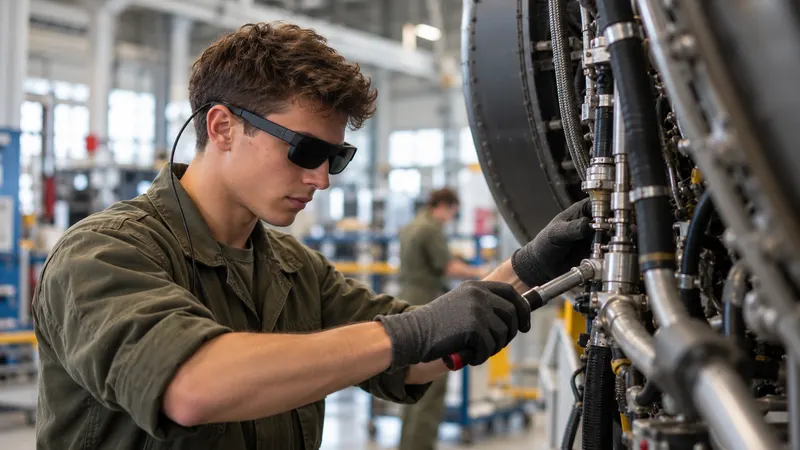
Glasses and headset application
In the field: the expert creates while performing the task, the learner learns on the real equipment, hands-free.
Discover the application
PC application
To go further: enrich, translate, have instructions read aloud, check learning and track your learners.
Discover the application
Our approach
First, understand how a hands-on skill is learnt. Only then, the tool.
Before designing our tool, we studied how people learn to do with their hands what they cannot yet do.
A learning method from our research work
With research laboratories, we studied how people learn a task they don’t know how to do, in a constrained environment. The aim is not to make people act like robots: it is for everyone to understand, remember and own the skill. This method is validated by 5 industrial PhD theses.
A creation method within every expert’s reach
The real challenge is creation: experts don’t have time, and not all of them are comfortable with digital tools. They create their own tutorials, very quickly, with the help of the built-in AI, and these tutorials apply the learning method without them needing to know it.
The tool we wish we’d had
As former industry professionals, we know every second counts: the expert’s time must be kept as short as possible. We also know the value of trade or defence secrets: everything works offline, without compromise, artificial intelligence included, right down to translating a tutorial in a few seconds.
The result: tutorials created in a few minutes, that really make people learn.
What sets us apart
Offline, hands-free, in a few minutes.
100% offline
Create and learn without a network. Your know-how never leaves your site: nothing on our side, no online account.
Learn moreHands-free
The expert creates while performing the task, glasses or headset on. The learner keeps both hands on the tool.
Learn moreA few minutes
One minute per instruction, a few minutes for a tutorial: no writing, no filming, no editing required.
Learn moreOffline AI
Translation and voice in each person’s language, by artificial intelligence that runs at your site, offline.
Learn more
One software package, several platforms
Your content does not depend on a single device.
Lightweight glasses or a headset: the same tutorial follows your equipment, today and tomorrow.
Augmented-reality headsets
Microsoft HoloLens 2, Samsung Galaxy XR.
Industrial glasses
Arvicom CART-S and, soon, CART-3D.
Augmented-reality glasses
VITURE Luma Ultra XR, XREAL Aura and VIVE Eagle glasses, which are lighter.
Windows PC
The PC application, on your computer.
Our hardware advice
The right equipment for your use, not the latest fad.
As former industry professionals, we advise you as we would have advised ourselves: the device suited to your constraints, your uses and your budget. Only operational solutions, proven in real conditions.
Your constraints
Environment, protective equipment, network: we start from your field conditions.
Your uses
Who creates, who learns, how many workstations: the right device for each use.
Your budget
Just the equipment you need, proven in real conditions, no more, no less.
Turnkey: we configure each device and fit it with the necessary accessories, so that it works in your environment and with your constraints. What we prepare
Compare
Instruction sheet, video, tablet or augmented-reality glasses?
| Criterion | Paper or PDF instruction sheet | Video filmed on a smartphone | Online platform, smartphone / tablet | SHIFT89 |
|---|---|---|---|---|
| Learner engagement | nonot read, rarely reread | partialwatched more than practised | partialthe screen draws attention away from the task | yesEngagement multiplied |
| Appeal to young people | no | partialfamiliar format, but passive | partialone more screen | yesA tool from their generation, that makes them want to learn |
| Showcasing teams, sites and trades | no | partialdepending on the quality of filming | partialone more digital tool | yesThe “wow” effect, with your customers and partners |
| Create without an Internet connection | yes | yes | noonline service¹ | yesNo network, end to end |
| Know-how and data kept at your site | yes | partialbackup and sharing often online | nohosted by the vendor¹ | yesNothing on our side |
| Offline AI | nono AI | noonline AI, if offered | noAI in the vendor’s cloud | yesFaster creation, fully secure |
| No dedicated hardware | yes | yesa phone is enough | partialone tablet per workstation | noaugmented-reality glasses, and an optional PC to go further |
| Created in a few minutes, no writing or editing | nowriting and layout | partialfilming, then editing | partialdepending on the tool | yes1 minute per instruction |
| Hands-free during creation | nowritten afterwards | partialwith a tripod or a second person | partialwith a tripod or a second person | yesGlasses or headset on |
| Task captured through the expert’s eyes, in first person | nophotos taken afterwards | nofilmed from the side or over the shoulder | nofilmed from the side or over the shoulder | yesWhat the expert sees, as they see it |
| Instruction placed on the real equipment | no | noshown elsewhere | partialthrough the screen, if offered | yesIn augmented reality |
| Learner guided step by step, hands-free | no | nopause and rewind by hand | partialstep by step, screen to hold or touch | yesBoth hands on the tool |
| Learning checked and learners tracked | no | no | yes | yesQuiz and tracking |
| Instruction in the learner’s language | noto be translated by hand | partialsubtitles to be made | yesoften translated online | yesAI on your computer, your data always protected |
yes partial no
¹ By nature, an online platform creates and stores content on its servers; some vendors offer on-site installation as an option. Comparison by category of tool, based on common practice: each tool has its strengths, and an instruction sheet is often enough for a simple fixed workstation.
To get started
What you need.
Glasses or headsets
We advise you on the right model and deliver it configured and equipped, ready to work at your site. Already have HoloLens 2 headsets? They stay in use.
A Windows PC, optional
To go further with your training and track your learners.
One day of training
For up to 8 of your experts: they create their first tutorial that same afternoon, then, from the next day, on their own, as much as is useful.
Support if needed
Additional days for a complex project, and SHIFT89 or our qualified partners to create your content if you are short of time.
Our partnersLicences on quotation
One licence per device, with volume discounts, and one licence for the PC application: annual, multi-year or for the lifetime of the hardware, as you choose.
End of Dynamics 365 Guides
Guides stops on 31 December 2026. Your HoloLens 2 headsets do not.
Microsoft is discontinuing Dynamics 365 Guides and Remote Assist. #AugmentedTraining runs on your HoloLens 2, without the cloud or a Microsoft subscription: your headsets and your experts stay productive.
Your best expert’s know-how deserves to be preserved.
A 30-minute to 2-hour demo, on one or more of your real cases, in your environment, with your teams. Just agree on a date.
or write to us