Automotive industry
A tier-one automotive supplier trains twice as fast
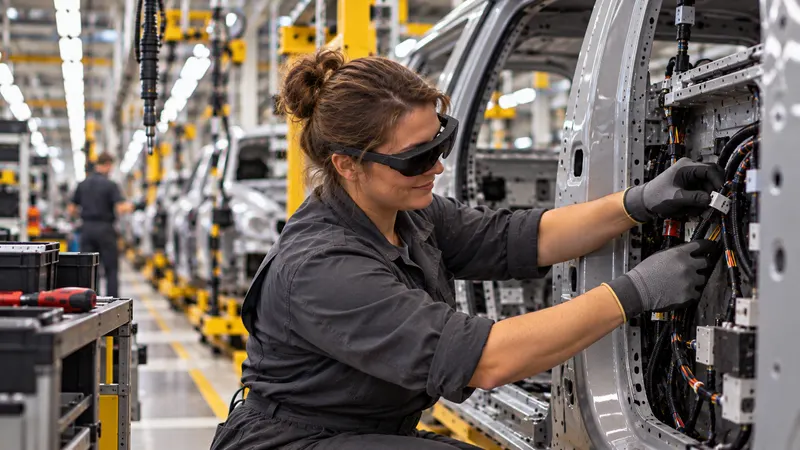
Autonomous operator training, guided in augmented reality on the real equipment.
Result: training speed doubled.
Automotive industry
Carmakers and suppliers: your know-how never leaves the site, with no smartphone and no cloud. Your experts pass on their skills in a few minutes, on the line; operators, temporary staff and new teams learn them hands-free, on the real equipment.
Your challenges
In the automotive industry, recruitment difficulties hold back activity, and many companies rely on apprenticeships or temporary staff.
In the automotive industry, retirements weigh heavily in staff turnover: every year, those taking over have to be recruited and trained.
IATF 16949 requires standardized work documents to be understood by operators, in their language, and available at the workstation (clause 8.5.1.2)1.
Vehicles and parts not yet shown to the public: their protection is subject to specific requirements, assessed under TISAX2. A photo taken on a smartphone is a photo that can get out.
Secrets to protectThe end of combustion engines affects many employees, and the battery sector has many people to train.
With every wave of temporary staff and every new team, workstation training starts again, and ties up your best operators.
High staff turnoverNew vehicle, new line: teams must be ready at start of production, while your experts are busy industrializing.
What SHIFT89 changes
No smartphone, no cloud: your workstation instructions, settings and images never leave your site. No network for your CISO to open.
Learn moreThe instruction is displayed on the real workstation, where action is needed: the operator keeps both hands on the part and eyes on the task.
Learn moreYour experts pass on their skills without leaving the line: one minute per instruction, with no writing or editing.
Learn moreIn the PC application, each instruction is translated and read aloud in the operator’s language, by an AI that runs at your site; a quiz checks that they have understood.
Learn moreUse cases
The workstation instruction shown on the real workstation, not on a screen: the operator sees where to act, in their own language, and a quiz checks that they have understood.
The points of the control plan shown where they are checked: everyone knows what matters, and why.
Your best setter’s know-how, available at every changeover, for every shift.
New line, new vehicle: your teams trained at the pace of industrialization, on the real equipment.
New tasks and new risks: the tutorial prepares for and rehearses the task; it does not replace electrical authorization.
Train as close as possible to the prototype, with no phone or cloud. Allowing a device with cameras into the area remains a decision for your security officer.
A fair comparison
They are excellent tools. For passing on a production skill, however, they impose a few constraints, by their very nature.
What we equip
The tutorial fits into your quality system: it shows the task at the workstation; your work documents remain the reference.
Our hardware advice
As former industry professionals, we advise you as we would have advised ourselves: the device suited to your workshop, your protective equipment and your budget. Only solutions proven in real conditions.
A device that can be worn with your protective equipment, at the pace of the line, not just in a demo room.
In a prototype area, the use of a device with cameras is a matter for your security officer. As everything runs offline, approval is easier to obtain; we help you prepare it.
No network to open, no online account: the recommended device works offline, like the rest of the solution.
The right number of devices, of the right model, for your lines and teams, without oversizing.
Turnkey: we configure each device and fit it with the necessary accessories, so that it works in your environment and with your constraints. What we prepare
Works on: Microsoft HoloLens 2, Arvicom CART-S, Samsung Galaxy XR, VITURE Luma Ultra XR, XREAL Aura and VIVE Eagle, and soon Arvicom CART-3D. Your content does not depend on a device.
Measured results
Measured in our deployments, at a tier-one automotive supplier: training twice as fast, autonomously.
Automotive industry
Autonomous operator training, guided in augmented reality on the real equipment.
Result: training speed doubled.
Industrial research
Our method stems from work carried out with Institut Mines-Télécom in a boiler manufacturing plant. It was compared with Microsoft Dynamics 365 Guides.
Result: a study published at IEEE ISMAR 2022, the leading international conference on augmented reality.
For confidentiality, we only name a customer with their written consent.
Former industry professionals, for industry
We built the tool we dreamed of having when we worked in industry: a tool that respects your teams’ time and the reality of the line. Every unnecessary click is lost productivity.
Funding and procurement
An off-the-shelf solution, on quotation. It is up to the buyer to qualify their purchase, according to the rules that apply to them.
One licence per device, glasses or headset, with volume discounts, and one licence for the PC application. Your choice: annual licences, multi-year licences or licences for the lifetime of the hardware. A quotation based on your project.
Your existing headsets remain in use, including after Dynamics 365 Guides.
After GuidesA one-hour scoping session by video call, one day on site with up to 8 of your experts, then standard project management. Additional support days when your project requires them.
Frequently asked questions
That is a decision for your security officer. Everything runs offline and no data goes to the software publisher: approval is easier to obtain, and we help you prepare it.
Yes. Each instruction is translated and read aloud in the operator’s language, by an AI that runs on your computer, offline. A quiz checks that it has been understood.
No. Your work documents remain the reference of your quality system. The tutorial shows them on the real workstation, where action is needed.
No. An instruction can be updated in a few minutes, by your expert, on the equipment or in the PC application.
No. No connection is required, whether to create, to learn or to track learners. Nothing is hosted by SHIFT89.
Guides ends on 31 December 2026, but your HoloLens 2 devices do not: they stay in service with SHIFT89. And your content does not depend on one device: other glasses and headsets are compatible.
A 30-minute to 2-hour demo, at one of your workstations.
or write to us